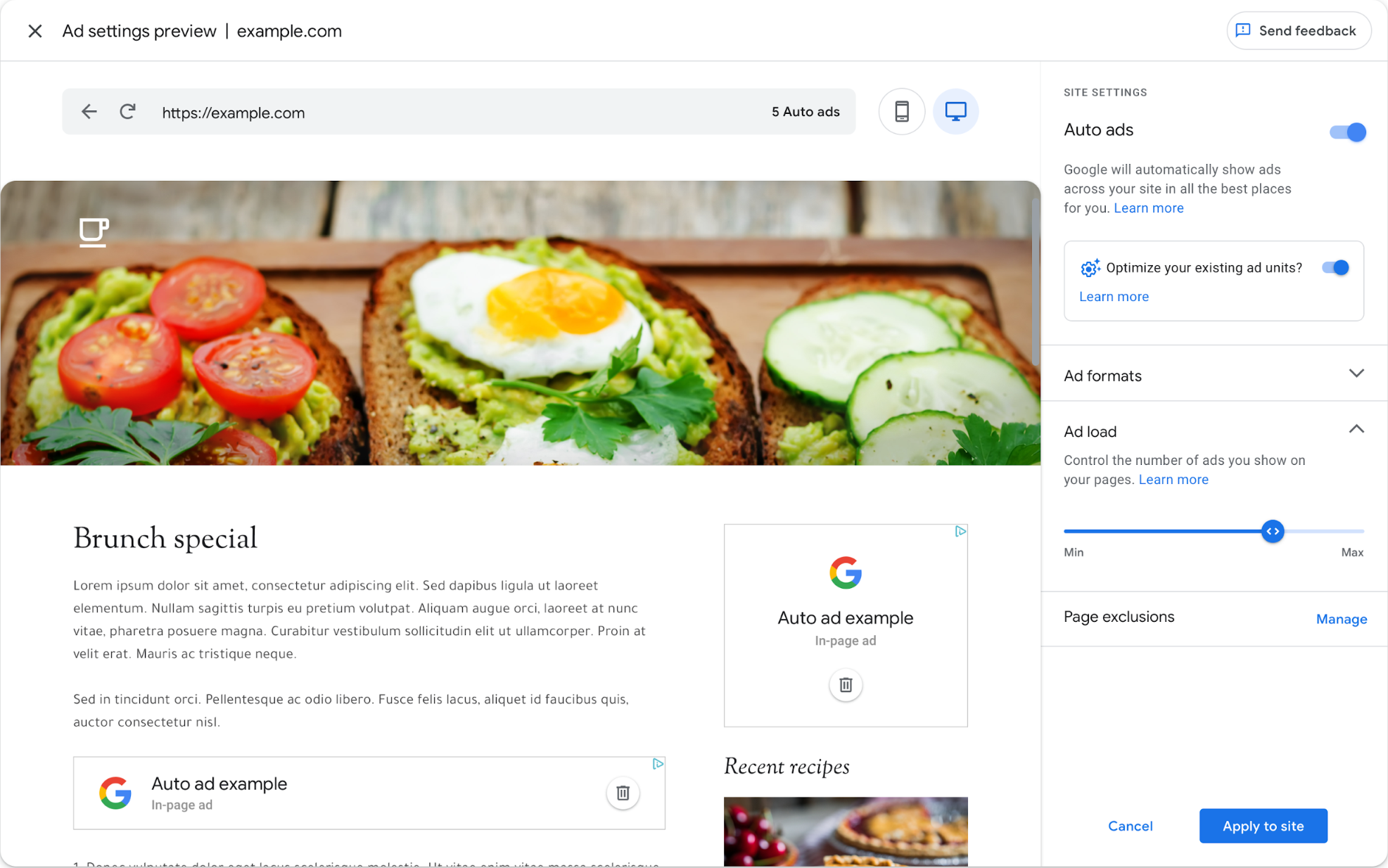
| | Your Publisher ID: pub-0743900184326146 | Sign in | | | | | Action required now | | Welcome to the updated Auto ads | | | | | | Action required now | | Welcome to the updated Auto ads | | | | | | We've developed a new version of Auto ads that gives you greater ability to customize the Auto ads experience for your users. | | Depending on how you use Auto ads, we'll try to closely match your current Auto ads settings. If we can't do this, you'll see a notification in your AdSense home page. If there's no notification, you don't need to take any action. | | | | | | What's changing? | |  | | | Auto ads now work through any ad code If you've turned on Auto ads for a site or a portion of your site, even pages that only contain regular ad units will start showing Auto ads on that page automatically. | | If there are specific pages you don't want Auto ads on, you can add those URLs to your Page exclusions. For example, you can turn off Auto ads on your home page or entire sections of your site. | | | | | | | | Ads > Overview shows you a summary of your Auto ads settings for each of your sites. | | | | | | | | Ad settings preview shows you how Auto ads will look on your site before they go live. When you make changes to your Auto ads settings, it can take up to an hour to apply on your site. | | Placement exclusions allow you to delete specific ad placements inside the preview using the "delete" icon. Auto ads will immediately generate a placement in a new location for you to review. | | | | | | | | Ad formats help you specify the types of ads that Auto ads places on your site. | | Matched content allows content recommendations from your site combined with ads to be shown to your users. | | | | | | | | Auto ads dynamically adjusts the number of ads in proportion to the length of each page. Ad load helps you control the number of ads you'd like to show on your pages. | | | | | | | | We've updated reporting so that you can see Auto ads and manual ad unit performance side by side for each of your sites. | | | | | | | | | | | | Auto ads now work through any ad code If you've turned on Auto ads for a site or a portion of your site, even pages that only contain regular ad units will start showing Auto ads on that page automatically. | | If there are specific pages you don't want Auto ads on, you can add those URLs to your Page exclusions. For example, you can turn off Auto ads on your home page or entire sections of your site. | | | | | | | | Ads > Overview shows you a summary of your Auto ads settings for each of your sites. | | | | | | | | Ad settings preview shows you how Auto ads will look on your site before they go live. When you make changes to your Auto ads settings, it can take up to an hour to apply on your site. | | Placement exclusions allow you to delete specific ad placements inside the preview using the "delete" icon. Auto ads will immediately generate a placement in a new location for you to review. | | | | | | | | Ad formats help you specify the types of ads that Auto ads places on your site. | | Matched content allows content recommendations from your site combined with ads to be shown to your users. | | | | | | | | Auto ads dynamically adjusts the number of ads in proportion to the length of each page. Ad load helps you control the number of ads you'd like to show on your pages. | | | | | | | | We've updated reporting so that you can see Auto ads and manual ad unit performance side by side for each of your sites. | | | | | | | | | | To tell us what you think of these changes, please Send Feedback using the link on the Ads > Overview page. We're looking forward to hearing your thoughts. | | | | | | | | | | | | |  
Read On
| | Your Publisher ID: pub-0743900184326146 | Sign In | | | | Policy Update | | Important AdSense policy update has launched | | | | | Policy Update | | Important AdSense policy update has launched | | | | | Dear AdSense Publisher, | | In August, we notified current publishers about the upcoming changes to Google's publisher policies through email and our change log. Effective today, those policy changes have launched across our publisher products (AdSense, AdMob, and Ad Manager). There's no action for you to take right now, other than to review this email, the AdSense Help Center, and the AdSense Policy Center to ensure your content remains in compliance. | | What's changed: | | As of today, we've simplified the way our publisher content policies are presented with a clear breakdown of the types of content where advertising is not allowed or will be restricted: | | | Google Publisher Policies, which outline the types of content that are not allowed to show ads through any of our publisher products. | | | | | | What it means for you as an AdSense publisher: | | Monetizing content that falls under the Google Publisher Restrictions is no longer a policy violation; instead, we will restrict advertising on that content as appropriate, based on the preferences of each advertising product and/or advertisers' individual preferences. In some cases this will mean that no advertising sources are bidding on your inventory and no ads will appear on this content. As a result, while you may choose to monetize content covered by the Google Publisher Restrictions, you will likely receive less advertising on this restricted content than you would receive on other, nonrestricted content. | | Content that falls under the Google Publisher Policies is not allowed to be monetized and you should not place ads against that content. Attempting to monetize policy-violating content may result in your account(s) being suspended or terminated. | | As a result of these changes, we will be updating the AdSense Policy Center with two new columns: "Must fix" and "Ad serving status". The "Must fix" column will indicate if there is an issue that must be fixed because it is a policy violation. The "Ad serving status" column will show if ads are not being served due to a policy violation or if demand is restricted. As before, the AdSense Policy Center gives detailed information about issues that may restrict ads from appearing on your sites, site sections, and pages, as well as how to resolve issues with ad serving and request reviews. | | Please note that these policies and restrictions apply in addition to any other policies governing your use of Google publisher products. | | What you need to do: | | The AdSense Help Center and Policy Center have been updated with the full breakdown of policies and restrictions. Please review these to better understand the changes that were made, and to ensure your content remains in compliance. | | Note that going forward, Google will be announcing updates to our policies and restrictions for AdSense on this change log. Publishers are required to keep abreast of changes to policies and be in compliance with them at all times. | | Sincerely, | | The Google AdSense Team | | | | | | | | | |  Read On
|
| |